Character Artist 3 Key Features
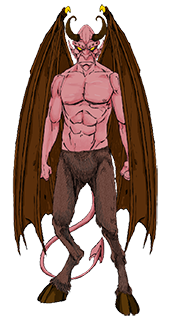
Character Artist 3 has a straightforward interface which lets you use thousands of pieces to create customised character portraits and humanoid creatures. Use any character on a character sheet, on a counter or card stand, or use the finished art for in published games.
-
Use over 9,000 symbols to create characters from: Dwarf, Elf, Gnome, Halfling, Half Elf, Half Orc and three body shapes of human ranging from thin to heroic.
-
Easy-to-use interface – just point at the body parts and clothes, then click on the view window.
-
All parts fit neatly together without extra effort on your part.
-
Customise the color of body parts and clothing, including the shading or highlight colors.
-
A wide selection of facial features give each character a unique look, or you can choose premade examples for speed.
-
Create many types of humanoid monsters then scale to fit. Gnolls, flaming demons, and lizard men are all a cinch.
-
Export the portraits at high resolution to character sheets, websites or publications.
-
Use portraits to make square counters and print them at any scale for use with wargames.
-
Use portraits to make card stand-up figures.
-
Create a silhouette or mirrored silhouette of your character.
-
All portraits can include text information such as attack values and defence values.
-
Character Artist 3 includes extra symbols for monsters, treasure, weapons and magical effects.
-
Many templates for creating counters, monsters, portraits with backdrops, stand-up counters at various miniature scale and square counters.
What's new in Character Artist 3
In short, an entirely new set of art by artist Rich Longmore. The art speaks for itself, but in addition to many more body parts, we have three body types (slim, normal, heroic) a variety of face furniture (noses, eyes, mouths) to make each character unique.