Search

Perspectives Pro Detail

Overview
Detail
Examples
Order now
Perspectives Pro box Package Contents
  • The Essentials manual
  • Perspectives Pro CD
  • 90 days web-based technical support
System Requirements
  • Essential - A licensed, working installation of CC2-Pro
  • 80MB hard disk space
Perspectives Pro

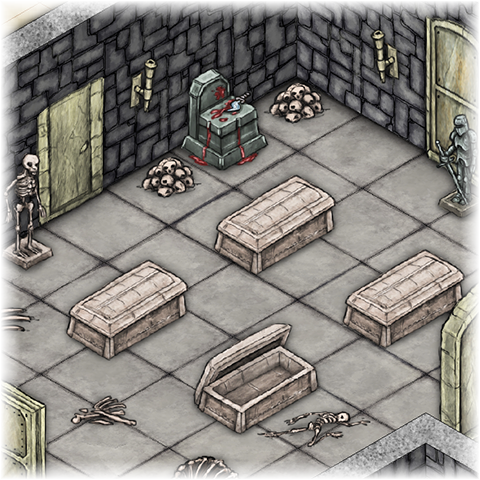
The Perspectives Pro add-on for CC2-Pro enables you to rapidly and simply create realistic 3D isometric views of your floorplans. Perspectives Pro is very easy to learn, yet powerful.

You can:
  • Draw floors, walls and rooms directly in isometric view.
  • Create textured surfaces using predefined settings.
  • Create your own textures.
  • Add solids and holes using cones, cylinders, 3D boxes and polygons.
  • Add a wide variety of symbols.
  • Create your own Per Pro symbols.
  • Convert existing 2D plans to Perspectives Pro.
  • Give 2D objects depth by extruding them.
Creating a Perspectives Pro floorplan...
  1. Pick the texture and color scheme to use for surfaces. You can combine any number of surfaces within a single map and create your own textures. (45 seconds)
    Texture and color dialog box
  2. Choose how you want front walls to be drawn. Front walls can be full height, reduced height, wire frame, or missing. This allows you to “see through” front walls, so they do not obscure the rooms behind. (30 seconds)
    Front wall removal
  3. Use the Wall, Floor and Room tools to build the basic floorplan. Click as many corners as you like, then click the height. Per-Pro creates and shades all the surfaces for you.(1 minute)
    Create basic floorplan
  4. Use the geometric shapes, such as 3D Box, 3D Polygon and Cylinder to add any platforms within the room. (30 seconds)
    3D symbols
  5. Place any symbols you want. Wall mounted symbols, such as doors, windows, pictures and levers, automatically sheer to match the wall. Floor mounted symbols come in four rotations, easily selectable using the arrow keys. (5 minutes)
    Create basic floorplan
  6. If you need a symbol not already in the 1000+ included with Perspectives Pro, use 3D tools such as 3D Project and Solid Extrude to create your own 3D objects.

Total time taken, 7 minutes 45 seconds.
Time to learn, half an hour.

Varicolor Symbols

Another new feature of Perspectives Pro is new Varicolor Symbols. CC2-Pro already has varicolor, where certain parts of the symbol adopt the current color. In Perspectives Pro, the highlights and shade areas in the symbol also change, following the base color.

Also available as part of the 3D and Whole Shebang bundles


This web site is ©2005, ProFantasy Software Ltd. Use of this website is subject to our terms and conditions. Site Map
ProFantasy Software, a partner of software.co.uk. Site hosted in the USA.
ProFantasy Software Ltd is registered in the UK at Spectrum House, Bromell's Road, London, SW4 0BN. No. 2843515